DRM Technologies: encryption, licensing, DRM restrictions
Protect IP

Protect documents regardless of location:
- Stop unauthorized access
- Stop sharing and distribution
- Strong US Gov strength encryption, DRM and licensing controls
Restrict Use

Set Expiry

Revoke Access

Watermark

Log Use

Comply Law

Benefits

 Free Trial & Demo
Trusted by:

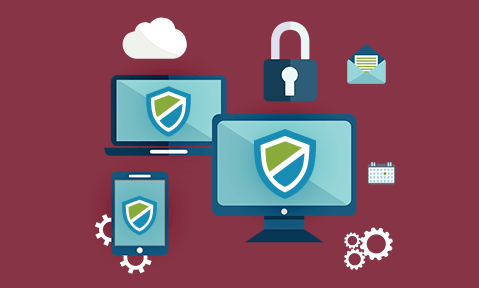
Digital Rights Management, encryption, and copy protection
Locklizard do not use a single technology in order to provide the DRM protection that allow you to enforce the license controls that you determine. Rather, we harness a range of technologies in order to achieve the features and functions that you expect from us. The technologies we use are described below.
 Locklizard DRM Technology
 Locklizard DRM Technology
- Digital Rights Management restrictions
- US Government strength encryption
- Uniquely encoded license authorizations
- Industry standards
- Simple to use
- Secure transfer of rights protection
- Print and screen grabber prevention
- Device & location locking
- NO weak password mechanisms
- NO storing of decrypted information to disk
- NO plug-ins to attack, or interoperability issues
- NO insecure JavaScript
DRM Protection : General Overview
As a leader in the field, Locklizard has moved both the technical quality of DRM protection and the functional quality significantly.
Earlier PDF security systems had often relied upon password ‘protection’- a technique that Elcomsoft demonstrated back in 2002, was fatally flawed. Systems also relied upon degrading the quality of printed copies, but did not stop the use of file drivers or screen grabbers or limit the amount of printing. Locklizard avoided these faults, delivering license codes and keys through secure online registration processes that use PKI class technology without the complications.
Locklizard avoided going down the route of using plug-ins to other Viewers and all the problems such approaches create (no longer work when host software is updated, or broken by other plug-ins), preferring a free-standing Viewer application that can be much more closely controlled, and can be instructed to operate in both online and offline modes, as well as resisting attacks by screen grabbers, and dynamically providing viewing and printing watermarks whilst only needing to protect the original document once.
We do not rely on the Adobe Security Handler so we are not vulnerable to PDF security weaknesses and attacks used to remove encryption and compromize digital signatures.
 | How Locklizard differs from other Document DRM & PDF Security systems |
Digital Rights Management (DRM) Controls
In the digital world you need the ability to control what can be done with digitized information once it goes outside your personal control. DRM protection sets out to control critical questions in regard to the type of document or file you are using. Locklizard’s copy protection software uses the strength of encryption to support the ability to rigorously enforce available DRM restrictions that determine:
- when a document or file can be viewed
- how long a document or file can be viewed for
- whether printing is allowed and if so how many times
- whether information can be copied and used in other applications
If an authorized user has lost their rights (perhaps they have not paid or, perhaps they have left the organization) then it must be possible to cease their access to information, and this is what our DRM software supports.

US Government Strength Encryption
Underpinning everything is our use of encryption technology. We use what is regarded (by the US government) as the strongest publicly available encryption algorithm, AES, to protect your information.
The AES (formerly Rijndael) encryption algorithm, is approved by the US National Institute for Standards and Technology as the winner of an international competition judged by the US National Security Agency – “NIST is pleased to announce the approval of the Federal Information Processing Standard (FIPS) for the Advanced Encryption Standard, FIPS-197. This standard specifies Rijndael as a FIPS-approved symmetric encryption algorithm that may be used by U.S. Government organizations (and others) to protect sensitive information.”
Locklizard DRM products use encryption to protect your PDF documents, ebooks, training courses, reports and files, and to ensure that license controls are applied to users or customers down to individual desktop level.
We do not rely on the Adobe Security Handler so we are not vulnerable to PDF security weaknesses and attacks used to remove encryption.
Database field encryption
For extra security and to simplify GDPR compliance we ensure user data is not exposed if a server hosting the Locklizard Administration System is hacked.
User fields are held encrypted in the database so that in the unlikely event that it is compromised, personal data is not accessible. The following fields are encrypted:
- User names
- Email addresses
- IP addresses
- Log files
The Locklizard Administration System uses database field encryption for both hosted and own server systems – whether you or Locklizard are hosting, your user’s data remains protected at all times.
License Control
We provide a granular series of mechanisms that provide you with sophisticated controls to be implemented over protected documents. By using an online Administration system (a permissions server) we provide IPR owners with the ability to control the number of times documents are printed, the number of times documents are viewed, stopping viewing after a ‘use-by’ date and verifying that the recipient is still in good standing (is still entitled to make licensed use of the protected information they have access to).
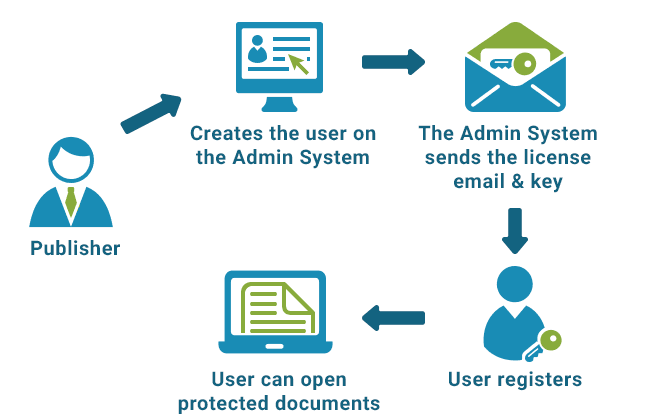
License authorizations are encoded uniquely to the individual desktop. We do this using a unique reference number for each desktop. An exchange of encrypted information takes place between the administration service and the user’s desktop when they register their right to a document, product or a publication. The policies for that user and document / product / publication are then enforced by reference to information contained in the encrypted files that they have received. There are no passwords to issue, manage or forget for document transfer or use.
Linking user policy to a specific desktop prevents a user from transferring their rights to any other desktop, and thus prevents users from giving others access to information, even if they copy their hard drive bit for bit onto another machine.
User initial registration must take place on-line, and license codes are tracked uniquely giving feedback to the publisher if there is any attempt to register multiple times or to different locations.
We do not breach user confidentiality (unlike many tracking systems that may be the subject to action by the European Commission or EC states for breaching their Data Protection legislation) and do not invade user privacy. Publishers may use tracking to indicate users / customers who appear to be acting in breach of their license agreements.
No use of Temporary Files
We do not use temporary files that may be processed later, or files that are ‘hidden’ from the operating system.
We inhibit third party products from creating and using temporary files that may leave unprotected copies of the publisher’s original file on the computer. Unfortunately, many commonly used programs compromise the level of security that our customers are entitled to expect. We therefore provide free proprietary secure viewers that allow files to be viewed without creating uncontrolled copies.
No Password Mechanisms
Many providers offer simplistic password protection systems in support of their products. Passwords have been, of course, the black hole of too many security systems and are known to be a flawed security technique. They are difficult to make crack proof (the Internet is stuffed full of password cracker systems) and it is almost impossible to prevent users from passing on their passwords to ‘friends and family’ as often as they want – why you should not password protect PDF files. The only secure solution is one where the user never has contact with the encryption key.
Locklizard does not provide a password based control because:
- they are too difficult to manage
- they are too easy to crack, because users cannot cope with long and complex character based strings
- users can give their passwords to others.
Locklizard supports a secret key exchange between our (or your) administration system and the user. There are no passwords or certificates to distribute or manage. What we actually do is to transfer decryption keys (64 character random passwords that cannot be guessed) without the end user having any possibility of gaining access to that information. Users cannot gain access to the key because it is hidden in an encrypted keystore on their computer, so they cannot pass it on. If they try to pass on their license file, the administration server will refuse to allow the license file to be used again, unless you, the publisher, authorize the situation.
So the Locklizard approach is fundamentally more secure than any password based system, and you should put into serious question any approach that recommends the use of passwords.
No insecure Plug-ins or JavaScript
PDF Plugins
We do not use plug-ins to other applications for several reasons. It is well known that plug-ins may act in conflict with each other, and that other plug-ins may be used to compromize security solutions plug-ins. Also, the applications being plugged into were not designed to operate in a secure manner, and it is not possible, as a plug-in, to control what the application can do, so any ability to compromise the application will also compromise the security.
Locklizard security cannot be compromised by plug-ins because we prevent all plug-ins from being loaded so that no vulnerabilities can be introduced.
- Read PDF Security Plug-ins for further information.
- See also PDF Security Issues for a list of poor implementation vulnerabilities.
JavaScript
We do not use JavaScript in our installed Viewers to control access and use to PDF content. This is because it can be easily manipulated by attackers to compromise user’s systems – this is true even for certified (digitally signed) PDF files.
If you enforce users to use a PDF security solution that uses JavaScript then you might want to consider the legal implications very carefully.
Adobe recommend that you disable JavaScript in Adobe Reader due to the fact that it is unsafe – it is regularly used by hackers to gain access to computers. Other major security companies also recommend you disable JavaScript in PDF Readers. More information on these vulnerabilities can be found at PDF Security Issues.
Document Watermarking
Locklizard DRM products support both dynamic and static watermarks to discourage copying of documents.
Dynamic watermarks may be used as a form of copy prevention, because the individual allowing the watermarked document to be copied is also associating their own identity with it, and they most likely do not want to be identified as the source of copied materials.
User identification can be applied to viewed and/or printed documents. Publishers only have to protect a document once as the secure viewer software dynamically applies the correct user and system information.
Static watermarks may also be used for copy preventing. In this approach, a diffraction pattern (sometimes referred to as a Moire fringe pattern) is used. Whilst the human eye is subtle enough to be able to ignore the pattern, mechanical devices such as scanners and photocopiers become confused by the presence of the pattern and produce substandard copies or cannot convert the graphic scanned image back into text accurately.
Proprietary Security Mechanisms
We use proprietary methods to prevent users printing to devices that do not identify themselves as real, physical printers, in order to resist copying through multiple printings.
Where printing is permitted, we provide sophisticated watermarking technology in order to identify the person/organization if they attempt to circulate documents that they have been authorized to print for their own (personal and private) study.
We also use proprietary methods in order to prevent PC screen grabbers from being able to locate the information that is being shown on the screen, preventing users from readily copying what is on the screen.
Digital Signatures
Often companies purchase digital certificates from a Certificate Authority (CA) as part of their overall approach to making the information they publish more secure.
However, when purchasing a certificate it is important to understand what functionality is being provided, since it may not fit with other parts of your solution going forwards.
A digital signature is only ever used to allow a recipient to verify the authenticity of the information they have received. This authenticity may be of two types:
- information that has been received has not been altered in any way
- the person digitally signing the information can be positively identified.
It does not prevent copying the file, extracting information from the file, or editing and re-presenting the information in an unsigned form.
Further, the verification process for digital signatures may not always check the status of the current status of the signature owner (when the user is offline, for instance) and so the accuracy of the check may not be as complete as expected. In fact, due to weaknesses in signature validation algorithms, digtally signed PDF documents can be altered without them being reported as tampered with. PDFs can also be altered after signing to trick PDF viewers into displaying content that looks different to the one that was signed. See PDF Security Vulnerabilities.
The Locklizard DRM protection system does not need to make use of digital signatures because they are a complex and expensive overhead that does not achieve as much as our own controls.
All information processed by Locklizard DRM systems is encrypted, so any attempt to alter any protected documents will fail because they will not decrypt correctly. This is also used to prevent those who have not been licensed from being able to use (read, print) the protected information. So it is not possible for a third party to either alter your information or pass the original on to other people.
Locklizard verify the existence, legal address and status of all organizations that purchase from us, and control the allocation of the publisher accounts so that they are always correctly associated with the legal entities that have actually purchased them. This gives end customers a greater sense of confidence that the publishers they are dealing with are genuine, rather than using the digital signature scheme which is not understood at all by the majority of computer users. In our experience pirates are not willing to expose their fiscal identities or attempt to pass themselves off as a similar identity as a third party where they have to pay a large cash sum. They would rather create a false web site or attempt to divert customers to purchase a fake product than part with actual money.
So the level of actual security we offer both you and your customers is better than that being offered by digital signature providers, as well as being more accurate and more useful in the longer term.
Secure Viewer Software
Why Locklizard uses its own secure viewers
The reasons for preferring to use our own secure viewer can be summarized under three headings: security, control and resilience.
Security
If you do not use your own viewer, then you are automatically exposed to any known attacks against the viewer you are using. If you work as a plug-in then you may or may not be able to ‘see’ what other plug-ins are also loaded, and other plug-ins, which may be present for operational reasons, may compromise or clash with the DRM security plug-in. If you masquerade as a ‘zero footprint’ approach, basically using JavaScript for protection which is embedded at the front of a file then processed by someone else’s viewer, then you are completely at the mercy of any attacker.
Other problems include the fact that if you are not the viewing application then you cannot enforce local security controls that the main viewer application does not support. Many controls have to be established at load time, and the plug-in and JavaScript systems have missed that boat.
Using your own secure viewer also allows you to take steps to reduce hacking opportunities. This may be by implementing code obfuscation, or by changing packaging between version updates, or by implementing code checking to prevent code injection, or any number of other techniques used in security systems. Naturally these are not accessible when you are merely arbitrary add-on code to someone else’s system.
Conclusion: if you are offering security, and you are not in charge of the environment then you are not offering security.
Control
Implementing a good DRM system is not for the faint-hearted. Whilst all information publishers agree that they want controls that prevent free re-distribution of their materials, few of them agree as to precisely which controls will meet their business requirement(s). This creates a situation where feature/function rich control systems have to be available in order to service a multiplicity of overlapping requirements. If the control application is not in command of its environment – it decides what features to display, it decides not to include code that could be used to circumvent controls – then it does not impose overall environmental control.
If you are not running your own secure viewer it simply is not possible to obtain this fundamental level of control that is a prerequisite to operating a DRM management system.
Conclusion: if you do not own the environment then you cannot realistically enforce controls that are ultimately outside of your control.
Resilience
When you are delivering services that rely completely on an environment provided by another party, then you are exposed to a high element of risk that any change introduced in their environment will impact on yours. The upgrade from Windows XP to Vista brought that problem home to many people, despite the testing that went on before launch to try and reduce risk. Using a fixed and controllable secure viewer means that you are insulated from the market pressures that the supplier of another viewer product faces. Also, code and data attacks that may work against other viewers may have no meaning if launched against you. Data attacks commonly rely upon exploiting buffer overflow because the attacker can predict what will be overwritten. But when hackers are trying to mount an attack against an unknown environment that is constantly changing (as far as the attack vectors shown to the attacker) their problems are increased significantly, and the likelihood of sustaining an exploit reduced at the same time.
Conclusion: if you are designing a DRM environment then you should place reliance in as little as possible if you want to achieve resilience.
Summary
Whilst it may be fashionable to claim that there are advantages to using ‘recognized standard viewers’ because, in theory, they offer the greatest satisfaction of access to new features and interoperability, this is to ignore fundamental security tenets. If the foundations of a product are open to ready attack, then anything built upon them is equally flawed. Security systems have to be judged on the degree to which they are independent of the environments in which they operate, and the range of control functions they can deliver. New features and functions are always highly attractive, but their price is a lack of security.
Customer Testimonials